Performance
This page compares DataZip against Python's built-in pickle module across two
representative workloads, measuring write time, read time, and output file
size. The figures and table below were produced by running
docs/benchmarks.py
from the repository root.
Methodology
| Parameter | Value |
|---|---|
| Repetitions | 7 (slowest dropped) |
| Timing | time.perf_counter() |
| I/O target | In-memory BytesIO (eliminates disk variability) |
| Machine | Apple M-series, macOS |
Test objects
Nested Dictionary — depth 10, branching factor 2
: A recursively nested dict reaching 10 levels deep with 2 children per node
(2¹⁰ = 1,024 leaf nodes). Each leaf holds a list of 50 integers, a float,
a string, and a list of strings — representative of deeply nested
configuration or tree data.
Mixed Object — 3 DataFrames + metadata
: A dict containing one large DataFrame (500k rows × 20 cols), two medium
DataFrames (50k rows × 10 cols each), a nested config dict, a list of
200 category labels, and a description str. This represents a realistic
analysis result or model output object.
For DataZip, each top-level key is stored as a separate named entry in the
archive (the natural DataZip usage pattern). For pickle, the entire dict is
serialized as a single blob.
Write Time
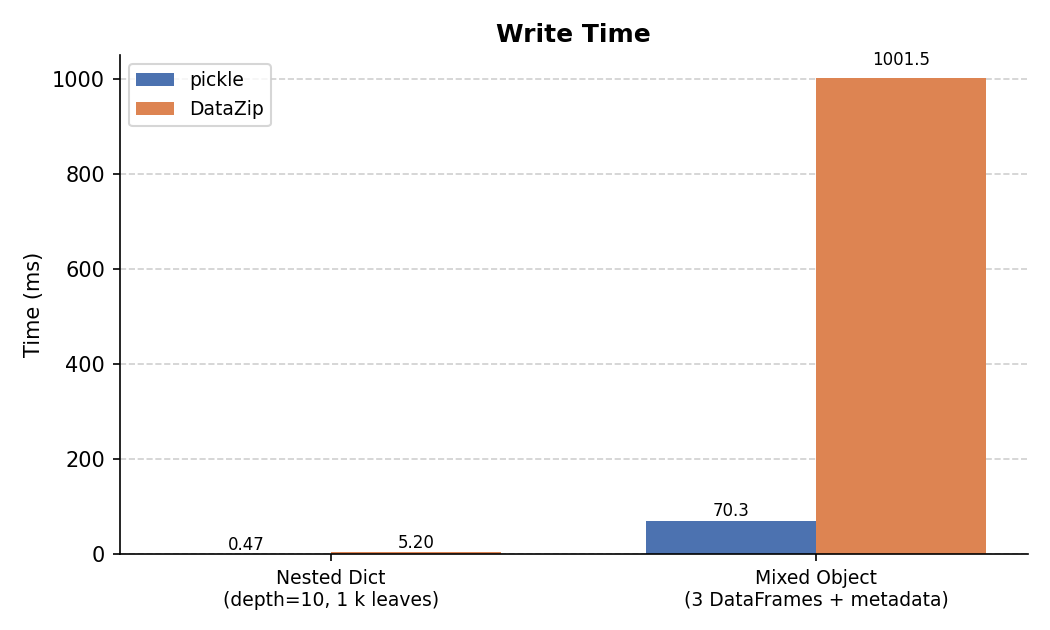
For the nested dict, pickle's binary protocol is faster because DataZip serializes through JSON and wraps the result in a zip container.
For the mixed object, DataZip is slower on write because it encodes each DataFrame to Parquet (which involves columnar compression), whereas pickle writes raw NumPy buffers in a single pass.
Read Time
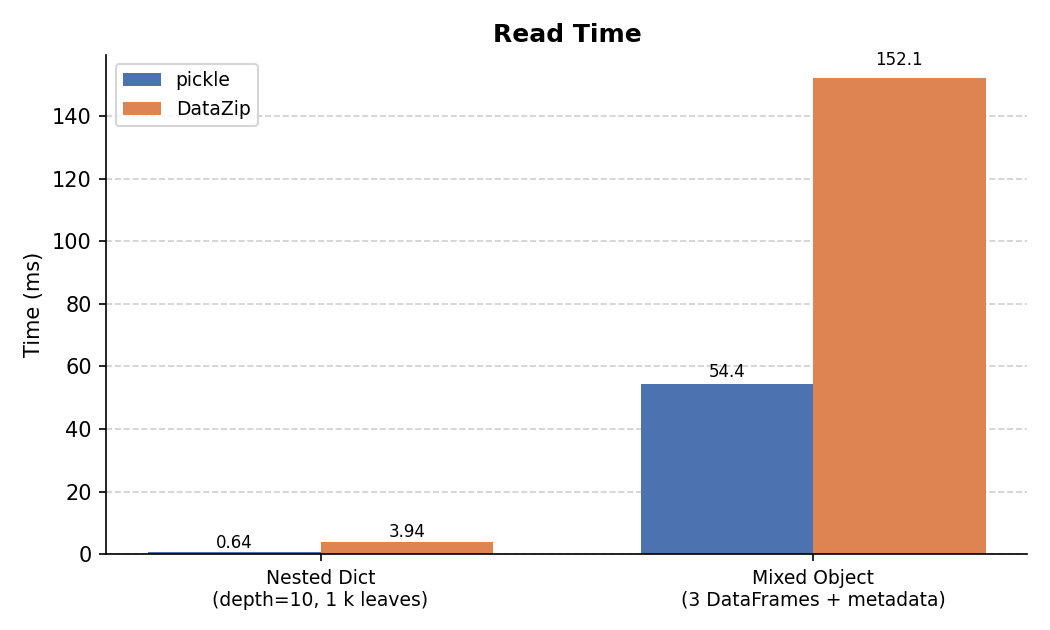
For the nested dict, pickle's read is faster for the same reasons as write.
For the mixed object, DataZip's read is slower than pickle's due to the Parquet decode step for each DataFrame, but remains practical even at these sizes.
File Size
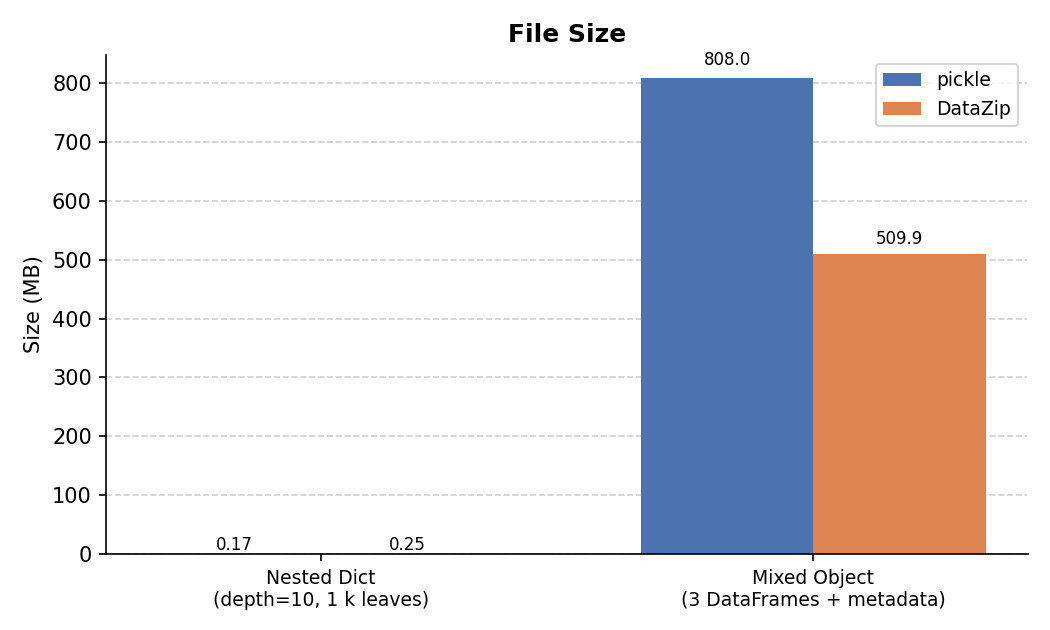
This is where the trade-off becomes clear:
- Nested dicts: DataZip's JSON representation is larger than pickle's compact
binary format (~11× in this case). DataZip uses
ZIP_STORED(no compression) by default; passingcompression=ZIP_DEFLATEDwould reduce this significantly. - Mixed object: DataZip stores each DataFrame as Parquet, which applies columnar compression to numeric data. The combined archive is ~34% smaller than the pickle blob, and this advantage grows with larger DataFrames or more repetitive values.
Partial / Lazy Read
A key advantage of DataZip's zip-based format is that entries are independent. When you read a single key, only that entry is deserialized — the binary files (Parquet, NumPy, …) stored for every other key are never opened.
pickle has no such capability: deserializing any part of a pickle blob
requires parsing the entire stream from the beginning.
The benchmark below reads one small key (config, a nested dict) from the
mixed object that also contains a 5 M-row DataFrame and two 50 k-row
DataFrames:
# pickle — must deserialize all three DataFrames just to reach 'config'
obj = pickle.loads(data)
result = obj["config"]

# DataZip — reads only the 'config' JSON entry; Parquet files are never touched
with DataZip(io.BytesIO(data), "r") as z:
    result = z["config"]
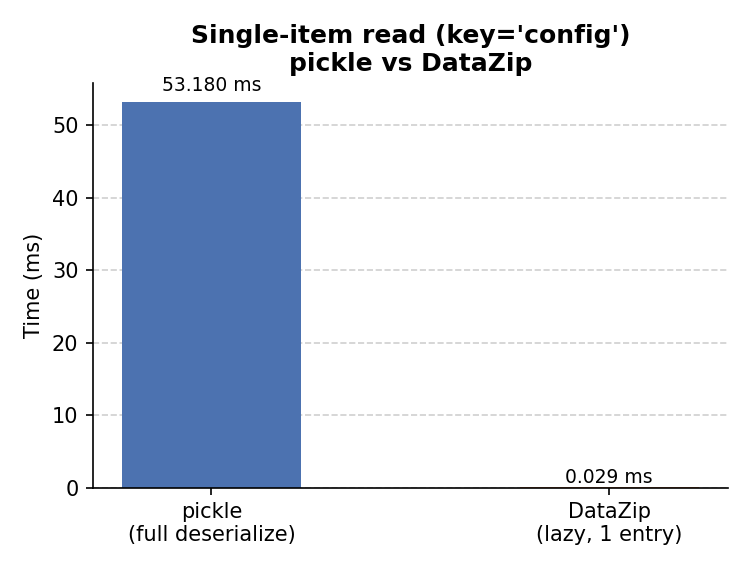
DataZip is substantially faster here because the total work is proportional to the size of the requested entry, not the size of the whole archive.
Summary Table
Measurements from a single representative run:
| Benchmark | Write: pickle | Write: DataZip | Read: pickle | Read: DataZip | Size: pickle | Size: DataZip |
|---|---|---|---|---|---|---|
| Nested Dict (depth=10, 1 k leaves) | 0.5 ms | 5.2 ms | 0.6 ms | 3.9 ms | 0.17 MB | 0.25 MB |
| Mixed Object (3 DataFrames + metadata) | 70.3 ms | 1001.5 ms | 54.4 ms | 152.1 ms | 808.00 MB | 509.86 MB |
Single-item read — reading only config from the mixed object:
| pickle (full deserialize) | DataZip (lazy, 1 entry) | |
|---|---|---|
Mixed Object → config key |
54 ms | 26 us |
When to use DataZip vs pickle
| DataZip | pickle | |
|---|---|---|
| Human-inspectable archive | ✓ | ✗ |
| Smaller file for DataFrames | ✓ | ✗ |
| Parquet interoperability | ✓ | ✗ |
| Faster for nested dicts | ✗ | ✓ |
| Faster for partial reads | ✓ | ✗ |
| Safer (no arbitrary code exec on load) | ✓ | ✗ |
| Reproducible across Python versions | ✓ (mostly) | ✗ |
Reducing DataZip file size for nested structures
Pass compression=ZIP_DEFLATED to enable zip compression:
or via the mixin: